 PredictionToolkit
What is ElonTweets.Live?
Start with the selected period and its observed total, then use the hourly breakdown and recent-history heatmap to put the pace in context. The interface includes a view that counts replies, which may differ from the posts a particular market includes. Forecast totals are derived estimates, not observed posts or final settlement counts.
Access is split between a delayed free service, Professional’s faster alerts and fuller dashboard, and a free Chrome extension usable without signup. Telegram is linked through the access flow and carries post context, timestamps and original links. The sidebar lets users keep counts and analytics visible alongside another browser tab.
Who it is for
- Users researching Elon Musk post-count contracts.
- Observers comparing posting patterns by hour and weekday.
- Users who prefer Telegram alerts or a browser sidebar.
Features and coverage
- Counters and hourly activity
Read totals for the displayed counting windows and their hourly distribution, including the reply-inclusive view.
- Heatmaps and projections
Compare recent hourly and weekday patterns, then inspect pace-derived estimates alongside the observed count.
- Telegram notifications
Receive post context, timestamps and original-post links through the service’s Telegram integration.
- Chrome sidebar
Keep tracking and analytics beside other research using the free, signup-free extension.
- Access tiers
Choose free tracking with a stated 1-minute delay or Professional’s faster notifications and full live counters.
Workflows with ElonTweets.Live
Compare pace with a bracket
Select the relevant window, inspect observed totals and hourly activity, and compare the projection with the market’s exact post-type and timing rules.
Interpret an activity burst
Read individual Telegram notifications, then return to the heatmap to compare the timing with recent patterns.
Track alongside a contract
Install the official Chrome extension and use its sidebar while reading the underlying market and its counting criteria.
Pricing and total cost
The Professional card lists US$144/month, while a nearby dynamic counter shows US$143. Confirm the amount in the access flow rather than treating the conflicting figures as a single settled price.
Free
US$0/month
- Notifications delayed by 1 minute.
- Limited dashboard, Telegram integration and heatmaps.
Professional
Listed at US$144/month
- Faster notifications and full live counters.
- Telegram alerts, heatmaps and projections.
- Priority support.
Chrome extension
Free
- Browser-sidebar tracking without signup.
Trial: The paid tier advertises a 3-day trial for US$1.
Access: The site says prices rise with the subscriber cohort and existing subscribers retain their rate.
Getting started
Before you start: The free feed is delayed by 1 minute.
- Open the dashboard and choose the relevant counting period.
- Start with delayed free access or request Professional.
- Link Telegram through the service’s access flow for notifications.
- Install the official Chrome Web Store extension if a sidebar is useful.
- Match post types and the time window to the exact market rules.
Free access has a stated 1-minute delay.
Useful links
What to check
- The free feed is delayed by 1 minute.
- The reply-inclusive view may count a different set of posts from the market.
- Projections are estimates and remain separate from observed counts.
- Public paid-price figures conflict; the final access quote determines the amount.
A closer look
Ratings & reviews
User reviews 0
The main score switches to user ratings after 5 published reviews.
A specific example helps the next person choose the right tool.
Related tools
Browse category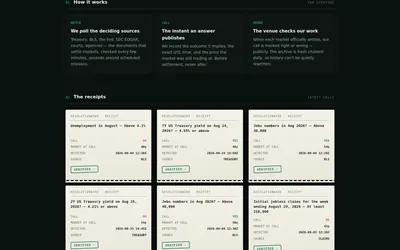
Document-based market research with deciding-source maps, timestamped receipts and a public record of settled calls.
- Access Web
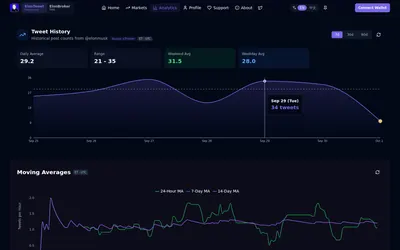

Research posting activity and count brackets through web analytics and the linked Telegram bot.
- Access Web · Telegram


A free research screener for sports, financial and macro contracts on Polymarket and Kalshi.
- Trading mode Read-only
- Access Web
Frequently asked questions about ElonTweets.Live
Does the Chrome extension cost money?
The website describes the extension as free and usable without signup.
Are Telegram alerts available?
Yes. Telegram integration is included in the listed access tiers and connected through the service’s access flow.
What changes between free and paid?
Notification delay and the extent of live dashboard access. Professional advertises faster notifications, not an independently established delivery time.
Is the projection the final market count?
No. It is an estimate. The market’s own time window and rules about which posts count determine its result.