 PredictionToolkit
What is PolyWatchDog?
Drag and resize widgets around the markets being monitored. The event explorer has grid and table views with tag and liquidity filters, while market details expose outcome prices, spread and book depth. These views let the dashboard focus on the question rather than a fixed general feed.
Find an address or screen traders by volume, win rate, PnL, ROI and trade count, then read positions, trades and cumulative PnL. Alert presets include whale trades, low-priced outcomes and large purchases of outcome shares. Monitoring, copying and webhooks have different effects, so inspect the chosen action before activation; a win rate also needs trade-count and exposure context.
Who it is for
- Users maintaining a multi-panel market watch screen.
- Researchers screening traders by results and activity.
- Users wanting explicit rules before receiving notifications.
Features and coverage
- Movable monitoring widgets
Drag and resize dashboard widgets to fit the monitoring task.
- Event grid, table and market detail
Filter tags and liquidity, then inspect outcome prices, spread and order-book depth.
- Trader screening and wallet history
Look up an address or filter volume, win rate, PnL, ROI and trade count; inspect positions, trades and cumulative PnL.
- Preset and custom alert rules
Configure conditions for whale trades, low-priced outcomes and large outcome-share purchases.
- Browser and Telegram alerts
Receive notifications through the listed browser or Telegram delivery routes.
- Visual copy and webhook workflows
Build automations that copy trades or trigger outbound webhooks, reviewing the action separately from its condition.
Workflows with PolyWatchDog
Arrange a focused watch screen
Add market, volume and alert widgets and arrange them around the events being watched.
Reduce alert noise
Set minimum trade size, category and wallet conditions before enabling Telegram delivery.
Investigate a trader before following
Screen activity and results, open wallet history and inspect current positions before following the trader.
Pricing and total cost
The landing page mentions a Max plan and a referral-based free-month offer. It does not publish a complete recurring-price table or full plan limits in the reviewed material.
Getting started
Before you start: An alert condition does not describe every consequence of a copy or webhook action.
- Open the dashboard and event explorer; choose grid or table and apply category/liquidity filters.
- Look up a wallet and read its history, then create a preset or custom rule.
- Configure browser or Telegram delivery and inspect automation actions separately from monitoring conditions.
Monitoring, copying and webhooks have different effects; inspect the selected action before activating its rule.
Useful links
What to check
- An alert condition does not describe every consequence of a copy or webhook action.
- Complete recurring prices and plan limits are not public in the reviewed landing material.
- Win rate requires trade-count, exposure and PnL context.
A closer look
Ratings & reviews
User reviews 0
The main score switches to user ratings after 5 published reviews.
A specific example helps the next person choose the right tool.
Related tools
Browse category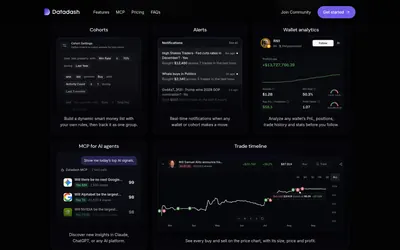

Build wallet groups, inspect copyability and receive cohort alerts in-app or through Telegram.
- Access Web · Telegram · API · MCP
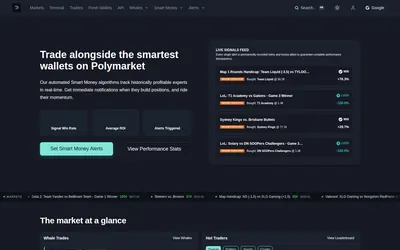
Watch outcome prices and wallet changes, receive email or Telegram alerts, and investigate markets in the terminal.
- Trading mode Paper
- Access Web · Telegram · Email
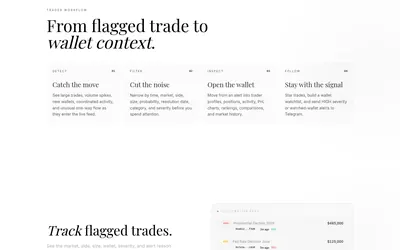
Polymarket trade investigation with wallet context, feed filters and Telegram notifications for high-severity events or watched wallets.
- Access Web · Telegram
Frequently asked questions about PolyWatchDog
Can I rearrange the dashboard?
Yes. Its monitoring widgets can be dragged and resized.
Can alerts arrive in Telegram?
Browser and Telegram delivery are listed.
Can I research a specific wallet?
Yes. Address lookup and wallet history are supported.
What actions can visual automation use?
The product lists copy-trade actions and outbound webhooks.