 PredictionToolkit

What is PolyGun?
Copy a fixed USDC amount, scale the leader’s individual trade by a percentage, or match the fraction of the leader’s portfolio allocated. Set a per-trade cap, entry-price range and slippage tolerance, with a daily-limit control where enabled. New tasks start muted; Manage → Unmute enables execution updates. Editing sizing affects future copies, and pausing or deleting a task leaves its existing positions open.
Cautious confirms every market order; Standard confirms orders above a chosen dollar threshold, documented by default as $100; Expert submits without a prompt and ignores that threshold. TP/SL handles automatic position exits. Crypto AutoPilot adds rule-based entries, with Both able to buy both sides when conditions match and Either choosing the first matching side. Sports is marked coming soon.
Who it is for
- Telegram users combining manual orders and copying.
- Traders researching frequently copied wallets.
- Users monitoring positions and PnL from mobile chat.
Features and coverage
- Manual market and limit orders
Search a market or paste its Polymarket link, then use market or limit buy and sell controls.
- 3 copying-size modes
Choose fixed USDC, a percentage of a leader’s trade or portfolio-weighted allocation; the latter matches portfolio share rather than individual-trade size.
- Copy exposure controls
Set maximum amount per trade, entry-price range and slippage. The management panel also offers a daily limit where enabled.
- Copy management and notifications
Use Home → Copy Trade → trader → Manage to edit future sizing, pause or delete. New tasks are muted; choose Unmute for execution updates.
- Market-order confirmation modes
Cautious asks every time, Standard asks above its configured threshold and Expert executes without a confirmation prompt.
- TP/SL and presets
Set automatic exits and manage active or closed take-profit and stop-loss orders.
- Crypto AutoPilot configuration
Configure asset, timeframe, direction, amount, final-seconds entry window, price range and optional TP/SL.
- Positions, PnL and reserved funds
Read position value and PnL separately from pending limit orders, reserved balance and available funds.
Workflows with PolyGun
Configure a copied wallet
Open Copy Trade → Add Copy Trade, enter the leader’s public wallet and nickname, select sizing, cap, entry range and slippage, then review all 7 setup steps and the final summary. Unmute if alerts are wanted.
Choose confirmation behavior
Open Settings and choose Cautious, Standard or Expert. Set the dollar threshold for Standard; Cautious confirms every market order and Expert does not use that threshold.
Build a crypto entry rule
Open AutoPilot → New. Choose BTC, ETH, SOL or XRP and an offered 5-minute, 15-minute, 1-hour or 4-hour round, then set direction, amount, final-seconds entry window, price range and optional exits.
Pause future activity
Pause the chosen copy or automation, then inspect existing positions separately. Stopping future copying does not instruct a position to close.
Pricing and total cost
The newer guide describes a dynamic fee curve based on the selected outcome’s probability but does not publish its numerical formula there. Use the bot’s quote for the actual trade. No separate subscription price is specified in that guide.
Fees and usage costs
- An older marketing claim of a flat 1% conflicts with the newer dynamic-fee guide and is not treated as a current universal rate.
Getting started
Before you start: Existing positions remain open after a copy task is paused or deleted.
- Start the official PolyGun bot and follow Wallet funding instructions for the chosen asset and network.
- Choose the market-order confirmation mode in Settings. For copying, complete all 7 setup steps and review the final summary.
- Enable Manage → Unmute for copy alerts if needed, and review positions, limit orders and available funds after execution.
Pausing or deleting a copy stops future copying but leaves existing positions open.
Useful links
What to check
- Existing positions remain open after a copy task is paused or deleted.
- New copy tasks are muted until notifications are enabled.
- Expert removes market-order confirmations; Standard’s documented default threshold is $100.
- Any Price removes the copy slippage ceiling; Exact Price may skip an entry after the price moves.
- AutoPilot documents crypto support, while sports is coming soon.
- AutoPilot Both may buy both sides when conditions match; Either chooses the first matching side.
A closer look
Ratings & reviews
User reviews 0
The main score switches to user ratings after 5 published reviews.
A specific example helps the next person choose the right tool.
Related tools
Browse category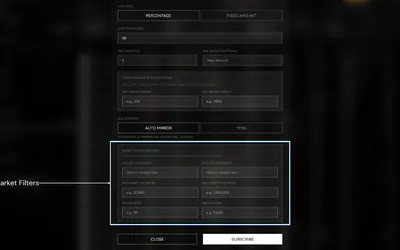

Configure wallet copies with size and market filters, while keeping Autopilot’s settlement-only policy distinct.
- Trading mode Manual · Live automation
- Access Web · Telegram
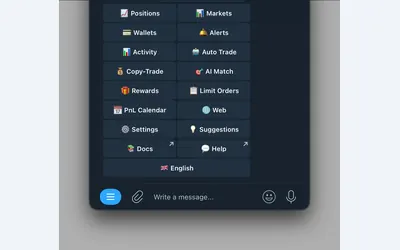

Polymarket wallet research, configurable copying and crypto or sports automation in Telegram and a connected web terminal.
- Trading mode Manual · Live automation
- Access Web · Telegram
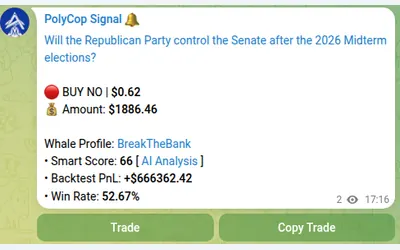

Copy Polymarket wallets in Telegram with separate buy/sell switches, controlled limit prices and layered exposure limits.
- Trading mode Manual · Live automation
- Access Telegram
Frequently asked questions about PolyGun
Why did a copied trade send no notification?
Copy tasks start muted. Open the trader’s Manage panel and select Unmute for execution updates.
Does deleting a copy close its positions?
No. Existing positions remain open and need separate management.
How does portfolio-weighted sizing differ from percentage copying?
Percentage copying scales the leader’s individual trade amount. Portfolio weighting matches the share of the leader’s portfolio used.
When does Standard require confirmation?
Market orders above the configured dollar threshold require confirmation; the documented default is $100.
Can AutoPilot monitor sports now?
The setup guide lists crypto as available and marks sports coming soon.
Which fee should I use for a trade?
Use the bot’s actual quote. The newer guide describes a dynamic probability-dependent curve without publishing the numeric curve there.