 PredictionToolkit

What is Polyfox?
Choose a percentage of the leader’s trade or a fixed dollar amount, then configure minimum and maximum copy sizes. Buy and sell settings are independent. A separately funded sub-wallet can isolate a leader’s budget and positions from manual trades and other strategies; this matters because copy-selling in the main wallet affects all held units of that outcome.
Fast Copy can act on a pending transaction that later reverts; disable it to follow confirmed trades. Pausing through a balance guard stops new mirroring but does not close positions, and deleting a copy does not sell them either. Automatic redemption of resolved winners is documented for the main wallet, not copy sub-wallets, so stopping and settling a strategy require separate attention.
Who it is for
- Telegram traders seeking detailed copy controls.
- Users assigning separate budgets to several leaders.
- Users combining manual orders and automatic copying.
Features and coverage
- Sizing and leader filters
Select fixed dollars or a percentage of the leader’s trade, and filter the original trade by size and outcome price.
- Limits after sizing
Apply your own minimum and maximum amounts after the copy amount is calculated. Distinguish Min Per Trade, which skips small copies, from the platform-floor setting that raises them.
- Separate buy and sell orders
Choose market or limit orders independently for each side, with slippage or limit-price offset and expiry controls.
- Isolated sub-wallets
Keep a copy’s budget and positions separate from other strategies and manual holdings.
- Exit rules and balance guards
Take profit and stop loss are available for market-sell mode. Balance thresholds pause copying but do not close holdings.
- Execution messages
Inspect filled, failed and skipped copies with the target price and actual execution price.
- Smart Wallets and backtests
Find possible leaders and inspect simulated historical copying, keeping simulation separate from live fills.
- Wallet export
The documented wallet flow includes private-key export.
Workflows with Polyfox
Create an isolated strategy
Choose a leader, create a sub-wallet copy and set its budget and sizing. Review buy and sell settings before funding.
Check small-copy behavior
By default the platform floor raises copies below US$1 to US$1. Disable that behavior if such trades should be skipped and review your separate Min Per Trade setting.
Protect manual outcome holdings
Use a sub-wallet when trading the same outcome manually: main-wallet copy-sell affects the combined holding of that outcome.
Stop and manage the remainder
Pause or delete the copy, then inspect and manage existing positions separately. Neither action is a sale.
Pricing and total cost
Published terms specify 1% on every manual or copied buy and sell, with no subscription and no extra copying charge.
Fees and usage costs
- Minimum deposit: US$10. Minimum trade: US$1.
- Polyfox charges no deposit or withdrawal fee; an external bridge fee can reduce the amount received on withdrawal.
- The suggested US$100 copying balance is a sizing recommendation, not the minimum deposit.
Getting started
Before you start: Fast Copy may copy a pending transaction that later reverts.
- Open @polyfox and inspect the menu.
- Select Smart Wallets or enter a public leader address in Create Copy Trade.
- Choose fixed or percentage sizing.
- Set leader-trade filters and your own per-trade limits.
- Choose a separately funded sub-wallet if isolation is needed.
- Review Fast Copy, order types, exits and the US$1-floor setting.
- Fund only after checking the complete configuration.
Fast Copy can follow a pending transaction that later reverts. Disable it when you want confirmed-trade copying.
Useful links
What to check
- Fast Copy may copy a pending transaction that later reverts.
- Balance guards pause new copying without closing positions.
- Deleting a copy does not sell its positions.
- Main-wallet copy-sell applies to all held units of that outcome, including manual holdings.
- Automatic redemption of resolved winners is documented for the main wallet, not copy sub-wallets.
A closer look
Ratings & reviews
User reviews 0
The main score switches to user ratings after 5 published reviews.
A specific example helps the next person choose the right tool.
Related tools
Browse category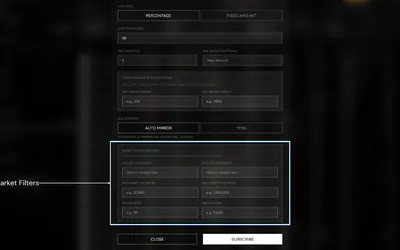

Configure wallet copies with size and market filters, while keeping Autopilot’s settlement-only policy distinct.
- Trading mode Manual · Live automation
- Access Web · Telegram
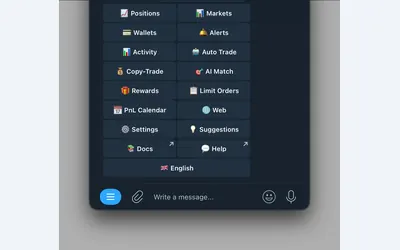

Polymarket wallet research, configurable copying and crypto or sports automation in Telegram and a connected web terminal.
- Trading mode Manual · Live automation
- Access Web · Telegram
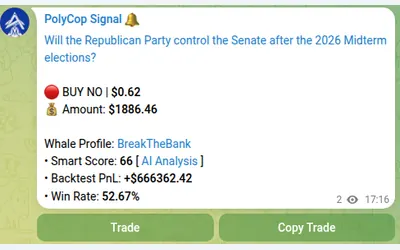

Copy Polymarket wallets in Telegram with separate buy/sell switches, controlled limit prices and layered exposure limits.
- Trading mode Manual · Live automation
- Access Telegram
Frequently asked questions about Polyfox
Which is the official bot?
The linked official bot is @polyfox.
Does pausing sell existing positions?
No. It stops new mirroring. Existing positions must be inspected and managed separately.
Why did a small copy become US$1?
The platform-floor setting raises small copies by default. Your own Min Per Trade instead skips copies below your selected minimum.
Can I isolate a leader?
Yes. Use a separately funded sub-wallet to isolate the copy’s balance and positions.
Does copying add another fee layer?
No. Copied and manual orders have the same 1% charge on each buy and sell, without an additional copying layer.