 PredictionToolkit

What is MKTGAP?
The available web calculator takes platforms, sides, contract count and ask prices, then displays gross and net gaps, an all-in pair cost and an illustrative PnL result. Per-leg fee breakdowns and links to formula sources make the assumptions visible. The calculator covers Kalshi, Polymarket and PredictIt, rather than every venue mentioned elsewhere on the site.
Its result is a calculation under entered assumptions, not a live arbitrage opportunity. Prices are manual, orders are not executed and matching settlement terms is still the user’s task. Slippage, funding costs, rebates and time to settlement are not fully included. Live gap feeds, Pro alerts and Data Client/API access were presented as forthcoming.
Who it is for
- Researchers comparing venue fees on a candidate contract pair.
- Users learning how costs can consume an apparent gross price difference.
Features and coverage
- Two-leg inputs
Choose the platforms and sides, then enter the number of contracts and current ask prices for the pair.
- Fee-adjusted breakdown
Inspect each leg’s fees, the combined cost and the net gap, with references to the underlying formulas.
- Methodology and exclusions
Read the comparison guides and identify which costs and assumptions sit outside the calculation.
Workflows with MKTGAP
Compare a candidate pair
Enter actual asks and the relevant category, then review the fee-adjusted total cost of both legs.
Stress the apparent gap
Account separately for slippage, deposits, withdrawals, rebates, settlement timing and differences between contract rules.
Pricing and total cost
The available public calculator can be used without payment. Prices had not been announced for Pro or Data Client, which were still presented as future services.
Access: The reviewed calculator required neither an account nor a wallet.
Getting started
Before you start: Prices are entered manually, without a live quote feed or order execution.
- Open the public fee calculator.
- Enter contract count, platforms, sides and current ask prices.
- Read the fee assumptions and account separately for costs excluded from the output.
No account or wallet was needed for the reviewed calculator; live data feeds and API services were not yet available.
Useful links
What to check
- Prices are entered manually, without a live quote feed or order execution.
- Slippage, funding costs, rebates and settlement timing are not fully included.
- The calculator covers Kalshi, Polymarket and PredictIt, rather than all venues discussed on the website.
- A positive calculated gap does not prove identical settlement terms or attainable fills.
- Pro alerts and Data Client/API access were planned, with no announced prices.
A closer look
Ratings & reviews
User reviews 0
The main score switches to user ratings after 5 published reviews.
A specific example helps the next person choose the right tool.
Related tools
Browse category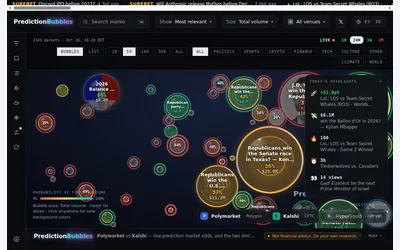

A visual market map whose bubble size follows a selected activity measure and whose color represents first-outcome probability.
- Access Web
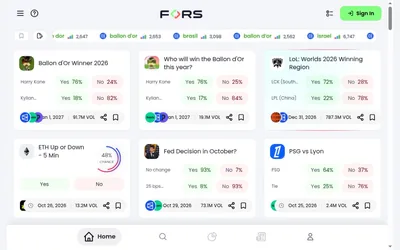

Compare venue-labelled events and investigate analytics and copy controls before assessing execution access and costs.
- Access Web
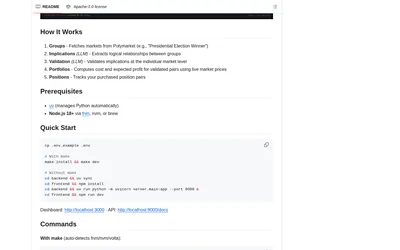
Run a local app to discover logical contract relationships, construct covering pairs and monitor paired positions.
- Access Web
Frequently asked questions about MKTGAP
Does the calculator fetch current quotes?
No. Users enter prices themselves, so the output depends on the accuracy and freshness of those inputs.
Is the API already available?
The reviewed pricing page described Data Client access and real-time Pro services as planned, without launch pricing.
What can I use free of charge?
The public manual calculator is accessible without payment. Pro and Data Client were forthcoming with prices unannounced.
Must I connect a wallet?
No account or wallet was needed for the calculator that was reviewed.