 PredictionToolkit

What is Ride?
Ride’s Smart Consensus summarizes trader activity, whale behavior and positions into a directional signal. Browse source traders, follow their activity and inspect an idea’s asset and consensus context. A manual swipe can take the same direction or the opposite side; Auto-Ride is a separate automatic-copy workflow whose sizing and destination instrument need their own review.
The iOS and Android product uses social login and a wallet the provider describes as custodial, with Apple Pay advertised for funding. Its coverage spans prediction markets, crypto, stocks, commodities and ETFs. The broad ‘up to 40×’ promotion applies to this multi-asset platform and does not establish leverage for every prediction contract. Starting amounts from $1 are advertised, but the public page does not explain all per-asset costs or copying limits.
Who it is for
- Mobile users following trader ideas.
- People comparing activity across asset classes.
- Traders who want both manual and automatic follow modes.
Features and coverage
- Smart Consensus
Combine activity and position signals into a directional summary.
- Trader discovery
Browse source traders and follow their publicized activity.
- Manual swipes
Follow an idea in the same direction or choose the opposite side.
- Auto-Ride
Enable the separate automatic-copy workflow after inspecting its settings.
- Activity notifications
Receive updates when followed traders act.
- Multi-asset interface
Browse prediction markets, crypto, stocks, commodities and ETFs.
- Social sign-in
Use the offered Google, Apple or X login methods.
- Custodial account and funding
The provider describes a managed wallet and advertises Apple Pay funding.
Workflows with Ride
Research an idea
Inspect the asset, source trader and consensus context before choosing a direction.
Follow manually
Review the displayed instrument, size and order quote before confirming the swipe.
Configure automatic following
Review Auto-Ride sizing and the destination instrument separately from simply subscribing to activity notifications.
Pricing and total cost
The provider advertises starting amounts from $1. A complete commission and spread schedule is not shown on the public page.
Getting started
Before you start: The wallet is custodial according to the provider.
- Use an official iOS or Android download link.
- Choose a supported sign-in method.
- Read the custodial account and funding terms.
- Follow traders and configure activity notifications.
- Inspect manual or Auto-Ride settings before use.
The provider describes the wallet as custodial.
Useful links
What to check
- The wallet is custodial according to the provider.
- The multi-asset ‘up to 40×’ claim does not establish leverage for every prediction contract.
- The public page does not specify every per-asset execution cost or copying limit.
- Documentation review did not test funded mobile execution.
A closer look
Ratings & reviews
User reviews 0
The main score switches to user ratings after 5 published reviews.
A specific example helps the next person choose the right tool.
Related tools
Browse category

A social prediction app with documented trader copying, limit orders and released combos.
- Access iOS · Android


Mobile trader research and copying with chosen allocations, direction settings and a dedicated Pro portfolio.
- Access iOS · Android
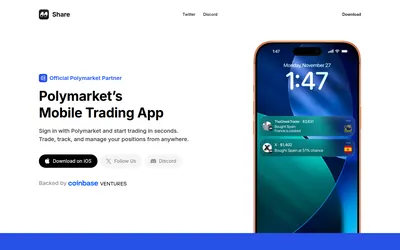

An iOS Polymarket interface combining market charts, positions, public-wallet notifications and social copy discovery.
- Access iOS
Frequently asked questions about Ride
Is there a mobile app?
The official site shows iOS and Android download links.
Is following always automatic?
No. Manual swipes and Auto-Ride are distinct workflows.
Is the wallet self-custodial?
No. The provider describes it as custodial.