 PredictionToolkit

What is PolySpark?
The workflow combines source-wallet discovery with automated copying. Inspect a trader, fund the bot account with USDC using its displayed network instructions, and set the intended exposure before activation.
PolySpark describes periodic automatic claiming every few minutes for eligible resolved positions. This collects a settlement payout; it does not sell an open position early. The advertised next-block execution describes the provider’s approach rather than a fixed fill-time commitment.
Who it is for
- Telegram users selecting a source trader and a bounded copy size.
- Users who want eligible resolved positions claimed periodically.
Features and coverage
- Wallet discovery and copying
Built-in filters help investigate public traders before qualifying activity from a selected wallet is copied.
- Sizing and exposure controls
Choose the copy size and available limits; the public page does not enumerate every risk-filter name or default.
- Periodic automatic claims
The bot describes checking eligible completed positions for claiming every few minutes.
- Sponsored trading gas
The provider advertises no user gas charge for its trading flow; platform trading fees remain a separate cost.
- Telegram account and referrals
Account setup and a referral-link area sit within the bot, without a separate desktop app. A referral reward is not the fee charged on a trade.
Workflows with PolySpark
Configure a trader
Inspect a candidate wallet, choose sizing and limits, and review the configuration before activating copying.
Reconcile a copied position
Compare the leader’s action with the executed position and adjust future sizing if exposure differs from the intended amount.
Check settlement
After resolution, inspect eligible claims and distinguish collected payouts from sales made before resolution.
Pricing and total cost
Sponsored trading gas is advertised, but the complete platform trading-fee rate is not published. Check the bot’s fee and order screens before funding; gas sponsorship and referral rewards do not establish free trading.
Getting started
Before you start: Next-block execution is a provider description, not a guaranteed fill time.
- Open the official polysparkbot in Telegram and complete account setup.
- Read the USDC funding instructions and verify the selected network.
- Inspect a source wallet, then configure copy sizing and available limits.
- Review executed positions and eligible claims in the bot.
The public page does not disclose all risk-filter names and defaults or the full trading-fee rate.
Useful links
What to check
- Next-block execution is a provider description, not a guaranteed fill time.
- Automatic claims require an eligible resolved position and do not replace an early sale.
- Filter defaults and the complete fee schedule require inspection inside the bot.
A closer look
Ratings & reviews
User reviews 0
The main score switches to user ratings after 5 published reviews.
A specific example helps the next person choose the right tool.
Related tools
Browse category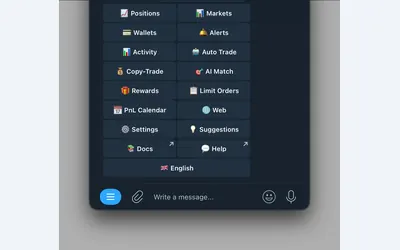
Polymarket wallet research, configurable copying and crypto or sports automation in Telegram and a connected web terminal.
- Trading mode Manual · Live automation
- Access Web · Telegram
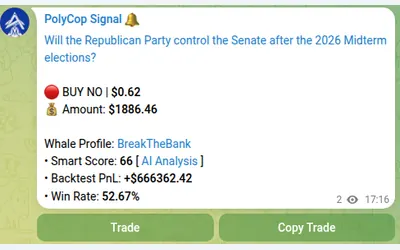
Copy Polymarket wallets in Telegram with separate buy/sell switches, controlled limit prices and layered exposure limits.
- Trading mode Manual · Live automation
- Access Telegram
Per-coin Linux bots with a simulation trial, provider dependencies and unresolved setup contradictions.
Frequently asked questions about PolySpark
Which Telegram bot does the site identify?
The official site points to polysparkbot. Use that entry point for account setup.
Can I choose how much to copy?
Yes. The documented onboarding includes copy sizing and available exposure limits.
Does sponsored gas remove trading fees?
No such conclusion follows. Gas and the platform trading fee are separate, and the full trading-fee rate is not publicly disclosed.
When does automatic claiming apply?
The product describes periodic claiming after eligible positions resolve, rather than selling them while the market is still open.